Click the "Create FTP account" link. You will see a screen that looks like:
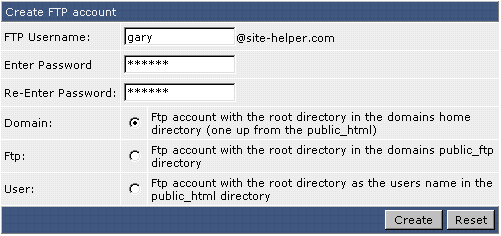
First, select a FTP username. In the above example, we chose "gary." Next, enter a password. Then, select the access level of the FTP account.
Domain: This FTP user has access to public_html, private_html, mail, domains, and backup directories.
FTP: This FTP user has access to the public_ftp directory only.
User: This FTP user has access to public_html/username/ only. If we selected this option in the above picture, the
FTP user would only have access to public_html/gary/ or http://www.site-helper.com/gary/. (If there is a
subdomain named gary.site-helper.com, this FTP user would also have access to it.
If the directory doesn't already exist, it will be created at this stage.
Finally, click the "Create" button.
