Nodeteria Hosting
  • 0 Shopping Cart
  • Home
  • Store
    • Browse All
    • Webhosting
    • Virtual Private Servers
    • Dedicated Servers
    • SSL
    • Voice Servers
    • Private Cloud
    • SSL Certificates
    • Register a New Domain
    • Transfer Domains to Us
  • Announcements
  • Knowledgebase
  • Network Status
  • Affiliates
  • Contact Us
  • More
  • Account
    • Login
    • Forgot Password?
  1. Portal Home
  2. Knowledgebase
  3. Directadmin
  4. FTP Accounts
  5. Deleting Accounts

  Categories

Directadmin
118
VPS
2

  Categories

  Support

My Support Tickets
Announcements
Knowledgebase
Downloads
Network Status
Open Ticket

Deleting Accounts Print

  • 0

To delete an account, place a checkbox next to the account you wish to delete and then click the "Delete Selected" button, as pictured here:
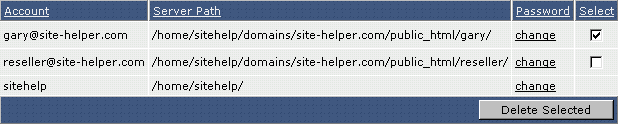


Note:  The FTP directory itself will not be deleted unless it is empty.


Was this answer helpful?

Related Articles

Creating FTP Accounts To create FTP accounts, first click on the "FTP Menu" icon in the main control panel screen.  You... Default FTP Account The default FTP account and control panel account have the same login name and password.  You... Creating a New Account Click the "Create FTP account" link.  You will see a screen that looks like:     First,... After Your Click "Create" After you click "Create," the control panel will show you the login information for the FTP... Logging into an FTP Account Step 1:  Obtain FTP client software.   Uploading to the server through FTP requires special...
« Back

  Support

My Support Tickets
Announcements
Knowledgebase
Downloads
Network Status
Open Ticket
  • Contact Us
  • Terms of Service

Copyright © 2026 Nodeteria Hosting. All Rights Reserved.


Loading...
Loading...
Choose language
العربية
Azerbaijani
Català
中文
Hrvatski
Čeština
Dansk
Nederlands
English
Estonian
Persian
Français
Deutsch
עברית
Magyar
Italiano
Macedonian
Norwegian
Português
Português
Română
Русский
Español
Svenska
Türkçe
Українська

Generate Password

Please enter a number between 8 and 64 for the password length