From the main control panel menu click the "MySQL Databases" icon and then click the "Create new Database" link.
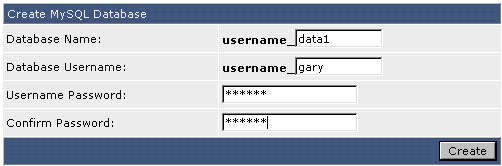
Choose a Database Name that helps you remember what the database is for. For example, enter "chat" if the database is intended to be used with a chat script. The database name is always preceded by your username and an underscore. If you chose "chat" for a name, the actual database name would be username_chat.
The Database Username is the login name for the database. It may be the same as the Database Name. In the above example, we chose a different login name (gary). As with the Database Name, the Database Username is also preceded by your username and an underscore (username_gary in this case).
After you have selected the database name and username, enter a database password and click the "Create" button.
